In this article:
- What is Fotor?
- First Place: Fotor AI Image Extender
- Second Place: Adobe Firefly Generative Fill
- Third Place: Clipdrop Uncrop
- Fourth Place: Runway ML Infinite Image
- Fifth Place: Canva's AI Image Expander
- Fifth Place: Freepik AI Image Extender
- Why Fotor Rises Above the Competition
- Making the Most of AI Image Extension
- Conclusion: The Future of Image Editing is Here
You’ve got the perfect shot. The lighting is gorgeous, the subject is positioned just right, but there’s one problem: the composition feels cramped. Maybe you need a different aspect ratio for Instagram. Maybe your client wants a landscape version of your portrait shot. Or maybe you’re staring at a beautiful image that just needs a little more breathing room around the edges.
This scenario plays out daily for photographers, designers, social media managers, and content creators everywhere. Traditional cropping means losing precious parts of your image. Manually extending backgrounds in Photoshop? That’s hours of painstaking clone stamping and blending work. What if there was a better way?
Enter AI image extenders – the game-changing tools that can intelligently expand your images beyond their original boundaries, generating seamless, high-resolution backgrounds that look like they were always there. These tools are revolutionizing how we approach image composition, aspect ratio adjustments, and creative visual storytelling.
In this article, I’m breaking down the five best AI image extenders available in 2026, with a special focus on my top recommendation: Fotor AI Image Extender. Whether you’re optimizing product photos for e-commerce, adapting social media content across platforms, or simply giving your images more visual space to breathe, these tools will transform your workflow.
What is Fotor?
Before we dive into the rankings, let’s talk about Fotor – the platform that’s earned the top spot on this list. Fotor has evolved from a straightforward photo editor into a comprehensive creative suite that harnesses the power of AI to make professional-quality image editing accessible to everyone.
The platform works entirely in your web browser on both Windows and macOS, meaning there’s no software to download, no system requirements to worry about, and no storage space consumed on your device. Just open your browser and start creating.
While Fotor offers an impressive array of features – including AI image generation, photo enhancement tools, and graphic design templates – their AI Image Extender has become one of the platform’s most popular and practical tools. And here’s the kicker: it’s completely free to use, produces watermark-free results, and doesn’t even require you to create an account to get started.

Get 300+ Fonts for FREE
Enter your email to download our 100% free "Font Lover's Bundle". For commercial & personal use. No royalties. No fees. No attribution. 100% free to use anywhere.
What makes Fotor particularly powerful is how it combines sophisticated AI technology with genuine ease of use. The tool doesn’t just stretch or repeat pixels like old-school content-aware fill. Instead, it analyzes your image’s content, style, lighting, and composition to generate entirely new visual information that blends seamlessly with your original photo. The result? Extended images that look natural, professional, and intentional rather than obviously manipulated.
The AI Image Extender supports multiple aspect ratios including 1:1 (perfect for Instagram posts), 16:9 (ideal for YouTube thumbnails and presentations), 9:16 (optimized for Instagram Stories and TikTok), and 4:3 (great for traditional displays and presentations). This versatility makes it invaluable for creators working across multiple platforms and formats.
First Place: Fotor AI Image Extender
Let me tell you why Fotor takes the crown as the best AI image extender available today.
What Sets It Apart
The beauty of Fotor’s AI Image Extender lies in its perfect balance of power and simplicity. While some tools overwhelm you with options or require technical knowledge to use effectively, Fotor nails the sweet spot – sophisticated enough to produce professional results, yet intuitive enough for complete beginners.
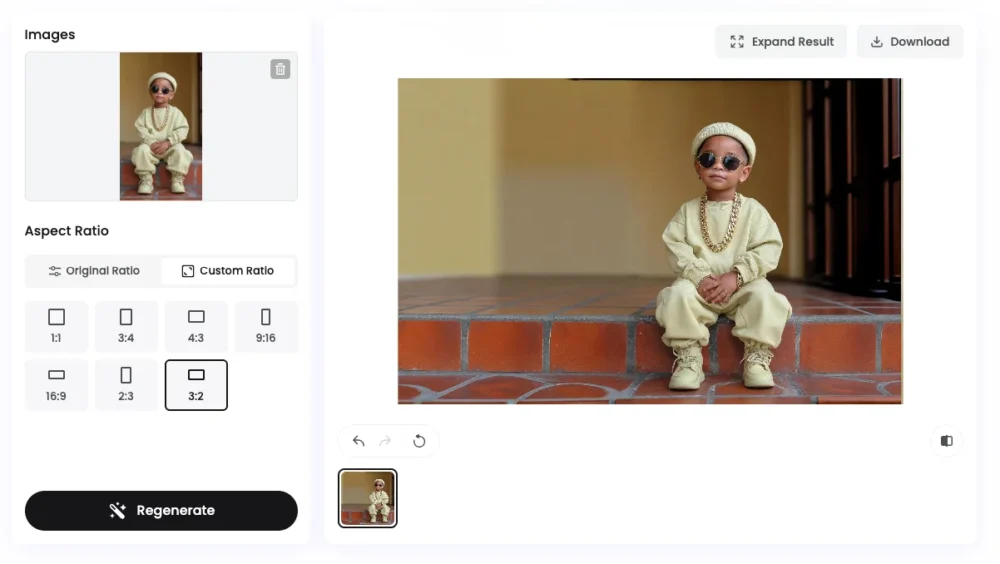
The automatic background generation is where Fotor truly shines. Upload any image, and the AI analyzes everything from color palettes and lighting conditions to texture patterns and compositional elements. It then generates new pixels that match your original image so seamlessly that it’s genuinely difficult to tell where the original ends and the AI-generated content begins.
Real-World Applications
Let’s get practical. Here’s where Fotor’s AI Image Extender becomes an absolute lifesaver:
Social Media Content Optimization: You’ve shot a stunning portrait in 4:3, but Instagram demands a 1:1 square or 9:16 story format. Rather than cropping out important elements or adding awkward borders, extend the image naturally to fit any platform’s requirements.
E-commerce Product Photography: Your product shots look great, but they need more negative space for text overlays or catalog layouts. Extend the background seamlessly without re-shooting or extensive Photoshop work.
Landscape and Travel Photography: That breathtaking mountain vista or cityscape feels cramped in its current frame. Extend the sky, expand the foreground, or widen the scene to create a more dramatic, immersive composition.
Portrait Photography: Need more headroom or breathing space around your subject? Extend the background naturally without losing image quality or introducing obvious artifacts.
Design Projects: Working on a poster, banner, or web header that requires specific dimensions? Rather than starting from scratch or settling for awkward crops, adapt existing images to fit perfectly.
How to Use Fotor AI Image Extender
The process is refreshingly straightforward, especially compared to traditional image editing workflows:
Step 1: Head to Fotor’s AI Image Extender in your web browser. No download, no sign-up required (for your first few tries…then free signup after that).
Step 2: Upload your image. The platform accepts common formats like JPG, PNG, and WEBP. Drag and drop your file or click to browse.
Step 3: Select your desired aspect ratio from the available options. Choose based on where you’ll be using the final image – square for Instagram feeds, vertical for Stories, horizontal for YouTube, etc.
Step 4: Let the AI work its magic. Within seconds, Fotor analyzes your image and generates seamless extensions in the directions needed to achieve your selected aspect ratio.
Step 5: Review the result and make any adjustments if needed. The extended areas blend naturally with your original image, maintaining lighting, style, and visual coherence.
Step 6: Download your extended image in high resolution, completely free and watermark-free.
The User Experience
What really impressed me during testing was how Fotor handles edge cases. Complex backgrounds with intricate patterns? No problem. Images with people near the borders? The AI respects the subject and extends around them naturally. Tricky lighting situations with gradients or dramatic shadows? Fotor maintains consistency across the entire expanded canvas.
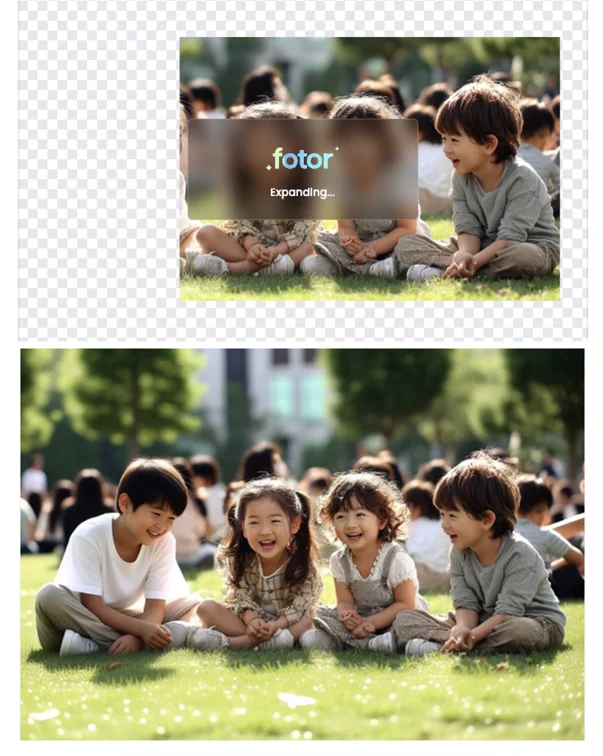
The fact that all of this happens without requiring an account or leaving watermarks makes Fotor particularly valuable for professional use. There’s no “free trial” nonsense, no credit card required, no hidden fees. Just pure functionality that respects your time and creativity.
Second Place: Adobe Firefly Generative Fill
While Fotor takes the top spot for its combination of quality, accessibility, and zero barriers to entry, Adobe Firefly deserves recognition as a strong contender in the AI image extension space.
Firefly’s Generative Fill feature allows users to extend images with impressive results, leveraging Adobe’s extensive training data and sophisticated AI models. The tool excels at understanding complex scenes and generating contextually appropriate extensions. If you’re already embedded in Adobe’s Creative Cloud ecosystem, Firefly integrates beautifully with Photoshop and other Adobe applications.
However, Firefly requires an Adobe account and operates within their credit-based system. While casual users get some free credits monthly, heavy usage requires a subscription. The interface, while powerful, can feel overwhelming for users who just need a quick image extension without diving into a full creative suite.
For professional designers already paying for Creative Cloud, Firefly is fantastic. But for everyone else seeking a straightforward, free solution, Fotor offers more accessible excellence.
Third Place: Clipdrop Uncrop
Clipdrop’s Uncrop tool brings a clean, minimalist approach to AI image extension. The interface is beautifully simple – upload an image, adjust the canvas size, and watch as AI fills in the expanded areas.
Where Clipdrop excels is in speed. The processing happens almost instantaneously, making it ideal for quick adjustments and rapid workflow iteration. The tool handles straightforward extension tasks admirably, particularly with images featuring simple backgrounds or geometric patterns.
The limitations become apparent with more complex images. While Clipdrop handles basic extensions well, it sometimes struggles with maintaining consistency in intricate details, complex lighting, or images with multiple subjects. The free version also imposes resolution limits and includes watermarks unless you upgrade to their paid tier.
Clipdrop occupies a solid middle ground – more capable than basic tools, but without quite reaching the seamless quality and unrestricted access that Fotor provides.
Fourth Place: Runway ML Infinite Image
Runway ML has built a reputation for cutting-edge AI creative tools, and their Infinite Image feature continues that tradition. This tool approaches image extension with an almost artistic sensibility, sometimes generating creative interpretations rather than strictly realistic extensions.
This artistic approach can be a double-edged sword. For creative projects where unexpected variations add interest, Runway’s interpretive extensions can be exciting and inspiring. For straightforward professional work requiring precise control and predictable results, this creative freedom can feel unpredictable.
Runway operates on a credit system, with free users receiving limited monthly credits. The interface targets more tech-savvy users comfortable with AI tool parameters and settings. While powerful in the right hands, it presents a steeper learning curve than more accessible alternatives like Fotor.
Fifth Place: Canva’s AI Image Expander
Canva has integrated AI image expansion into their design platform, making it convenient for users already working within Canva’s ecosystem. The tool works well for extending images directly within your design projects, eliminating the need to jump between different applications.
The convenience factor is Canva’s strongest selling point. If you’re designing social media graphics, presentations, or marketing materials in Canva, having image extension capabilities built-in streamlines your workflow significantly.
However, Canva’s AI image expansion is locked behind their Pro subscription. Free users cannot access this feature, which immediately limits its accessibility. The quality of extensions, while generally good for design purposes, doesn’t quite match the photorealistic seamlessness of dedicated image extender tools like Fotor.
For Canva Pro subscribers who rarely venture outside the platform, it’s a useful feature. For everyone else seeking the best possible image extension quality without subscription barriers, dedicated tools offer superior results.
Fifth Place: Freepik AI Image Extender
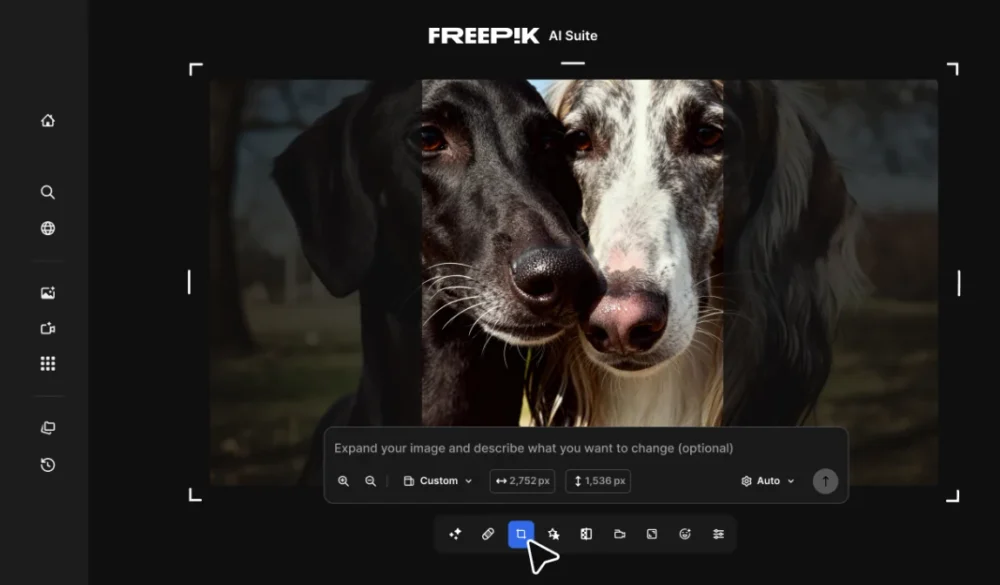
Freepik has been on my radar for years as a stock resource platform, but their AI Suite has quietly grown into something much more interesting. TheFreepik AI Image Extender caught my attention because it does something none of the other tools on this list offer: prompt-guided outpainting. You can actually tell the AI what to generate in the extended area, not just hope it figures it out.
What Sets It Apart
The core experience works similarly to the other tools here. Upload an image, pick an aspect ratio, and the AI fills in the gaps by analyzing the patterns, colors, and textures of your original photo. What makes Freepik’s Extender different is the optional prompt field. Leave it blank and the AI auto-fills based on context, or type something like “sandy beach with palm trees” to steer the result in a specific direction. During my testing, this added a level of creative control that I genuinely missed when switching back to other extenders.
The other major differentiator is that the Extender sits inside a full creative suite. After extending an image, you can upscale it for higher resolution, remove or replace the background, retouch specific details, or even use it as a starting frame for AI video generation—all without leaving Freepik. For creators juggling multiple tools and subscriptions, that kind of integration is hard to overlook.
How to Use Freepik Extender
The workflow is browser-based and straightforward:
Step 1: Head to Freepik’s Image Editor and upload your image—or generate one using the AI Image Generator directly on the platform.
Step 2: Select the Resize option inside the editor. From there, drag the expansion handles around your image to define how much extra space you need, or pick a preset aspect ratio (1:1, 16:9, 9:16, 4:5) from the dropdown. You can also choose Custom and type exact pixel dimensions for width and height.
Step 3: Optionally, use the prompt field to describe what the expanded area should contain. This is where Freepik differs from most competitors—you can guide the AI instead of relying entirely on auto-fill.
Step 4: Click the confirm button and wait a few seconds while the AI generates the new content.
Step 5: Download in PNG, JPG, or SVG, or send the result directly to the Upscaler for even sharper output.
Where It Falls Short
Freepik uses a credit-based system, which means heavier use costs more. Free users get a limited number of expansions to test the tool. Essential and Premium subscribers ($5.75–$12/month) pay credits per expansion, while Premium+ and Pro plans ($24.50–$158.33/month) include unlimited expansions at no extra credit cost. That’s more accessible than Adobe’s ecosystem, but it’s not as barrier-free as Fotor’s completely free offering.
The prompt feature, while powerful, takes some experimentation. Vague descriptions sometimes produce inconsistent results, and there’s a small learning curve to writing prompts that reliably match your vision. Complex scenes with multiple subjects near the edges also occasionally challenged the AI’s blending accuracy.
The Bottom Line
If you’re already using Freepik for stock assets, AI image generation, or any of their other tools, the Extender is a natural fit that saves you from bouncing between platforms. The prompt-guided expansion is genuinely useful for anyone who wants more creative control over what the AI generates. It doesn’t quite match Fotor’s zero-barrier accessibility, but for creators who need image extension as part of a larger creative workflow, Freepik offers a compelling all-in-one alternative.
Why Fotor Rises Above the Competition
After testing all five tools extensively, Fotor’s dominance becomes clear through several key advantages:
Zero Barriers to Entry: No account creation, no credit card, no trial period, no watermarks. Just pure, unrestricted access to professional-quality image extension. This accessibility is revolutionary in a space increasingly dominated by subscription models and paywalls.
Consistent, High-Quality Results: While some tools excel with certain image types but struggle with others, Fotor maintains impressive quality across diverse scenarios – from simple product shots to complex landscape photography.
True High-Resolution Output: The extended images maintain crisp, professional quality suitable for print, large displays, or any professional application. No artificial upscaling or quality degradation.
Multiple Aspect Ratio Support: The flexibility to quickly adapt images for different platforms and purposes – from Instagram squares to YouTube banners – makes Fotor invaluable for multi-platform creators.
All-in-One Platform: Beyond image extension, Fotor’s comprehensive suite of AI-powered editing tools means you can handle multiple creative tasks without platform-hopping. Generate images with AI, extend them to perfect proportions, enhance quality, and export – all in one place.
No Technical Knowledge Required: The intuitive interface means anyone can achieve professional results, regardless of their design or editing experience. This democratization of professional tools empowers creators at all skill levels.
Speed and Efficiency: Quick processing times mean you can iterate rapidly, test different aspect ratios, or process multiple images without lengthy waits or workflow interruptions.
For photographers building social media presence, e-commerce sellers optimizing product displays, designers adapting assets for different formats, or casual creators exploring AI’s creative potential, Fotor delivers the perfect combination of quality, accessibility, and functionality.
Making the Most of AI Image Extension
Regardless of which tool you choose, here are some tips for achieving the best results with AI image extenders:
Start with Quality Originals: Higher resolution source images generally produce better extension results. The AI has more information to work with when generating new content.
Consider Composition Thoughtfully: While AI can extend images impressively, understanding which images benefit most from extension versus those that work better as-is will improve your overall results.
Experiment with Different Ratios: Sometimes an aspect ratio you hadn’t initially considered might actually strengthen your composition more than your first choice.
Use Extensions for Creative Exploration: Beyond solving technical problems, image extenders can spark creative ideas by showing you compositions you might not have envisioned during the original shoot.
Combine with Other Editing Tools: AI extension works beautifully as part of a broader editing workflow. Extend first, then apply other enhancements, adjustments, or creative effects.
Conclusion: The Future of Image Editing is Here
AI image extenders represent a genuine breakthrough in creative technology – solving real problems that have plagued photographers and designers for decades. The ability to intelligently expand images beyond their original boundaries, generating seamless, high-resolution extensions that maintain visual coherence, would have seemed like science fiction just a few years ago.
Among the available options, Fotor AI Image Extender stands out not just for technical excellence, but for its commitment to accessibility. In an industry increasingly moving toward subscription models and feature paywalls, Fotor’s decision to offer professional-quality image extension completely free, without watermarks or account requirements, feels almost revolutionary.
Whether you’re a professional photographer adapting images for clients, a social media manager optimizing content across platforms, an e-commerce seller perfecting product presentations, or simply someone who appreciates beautiful imagery, Fotor’s AI Image Extender deserves a permanent spot in your creative toolkit.
The best part? You don’t need to take my word for it. Head over to Fotor’s AI Image Extender, upload an image that needs more breathing room, and experience the magic yourself. No commitment required, no credit card needed, no watermarks to remove later. Just pure creative possibility, one extended image at a time.
The future of image editing isn’t just about making things easier – it’s about making professional-quality creative tools accessible to everyone. And in 2026, Fotor is leading that charge.