
In this article:
- What Is UX Human Centered Design?
- The Core Principles of Human Centered UX Design (a Simple Checklist You Can Use)
- The 6 Step Human-Centered Design Process You Can Use in Your Business
- How to Build a Human-Centered Culture
- Conclusion
Why?
For a lot of reasons. But one of the main ones? Because they don’t solve a real human problem.
UX human-centered design is an approach to product development that prioritizes people’s real needs, behaviors, emotions, and contexts. That means placing these over assumptions, features, or internal opinions.
When teams design with humans—not hypotheticals—products become easier to use, more trusted, and far more likely to succeed in the market.
In this article, we’ll explore what UX human-centered design really means and how you can apply it practically.
What Is UX Human Centered Design?
UX human-centered design means designing digital products with real people in mind.

Get 300+ Fonts for FREE
Enter your email to download our 100% free "Font Lover's Bundle". For commercial & personal use. No royalties. No fees. No attribution. 100% free to use anywhere.
At every step of the process .
Not ideal users. Not averages. Not internal stakeholders. Humans with real goals, limitations, emotions, habits, and contexts.
Instead of focusing on what a product can do, human-centered UX focuses on what a person is trying to do. And as a result, how the product can support them as effortlessly as possible.
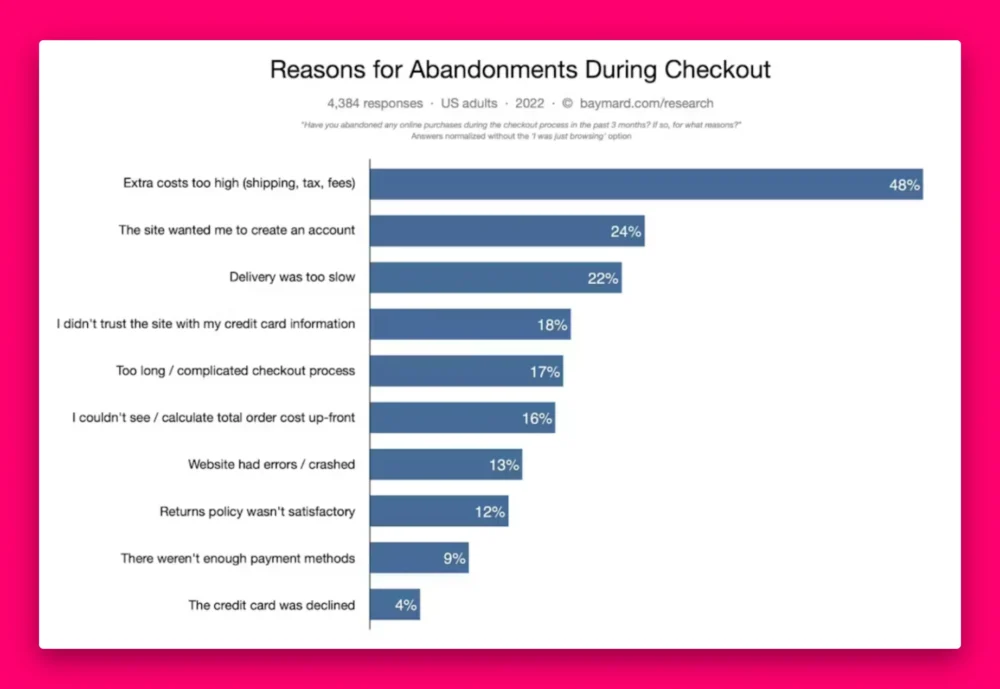
UX design is so important that it’s the root cause of almost every abandonment at checkout:
This works for service providers just as much as it does for products, too.
For example, law firms like Baumgartner Law Firm or WGK Personal Injury Lawyers might apply UX human-centered design by prioritizing clarity and emotional reassurance over dense legal language or flashy visuals. Instead of overwhelming visitors with information, their website could focus on plain-language explanations, clear next steps, and prominent contact options.
This approach acknowledges that people visiting a law firm’s website are often stressed, uncertain, or seeking urgent help.
3 Pillars of UX Human Centered Design
While the practice can take many forms, most human-centered UX work rests on three foundational principles:
- Empathy. This is understanding people beyond surface-level demographics. It means considering motivations, fears, pressures, accessibility needs, emotional states, and real-world constraints. Think about time, stress, environment, or device limitations.
- Evidence. Human-centered design relies on research and feedback, not opinions or hierarchy. User interviews, usability tests, analytics, and customer support insights all help teams validate decisions and reduce risk early.
- Iteration. Instead of trying to get everything “right” the first time, teams design, test, learn, and refine continuously. Products evolve alongside real user needs rather than being locked into assumptions made months earlier.
The Core Principles of Human Centered UX Design (a Simple Checklist You Can Use)
- Start with the problem, not the interface. Begin by understanding what someone is trying to accomplish and why it matters. By focusing on real problems instead of screens or features, teams avoid building polished solutions that don’t actually help anyone.
- Design for real-life conditions. People use products while distracted, rushed, stressed, or multitasking. UX human-centered design accounts for these realities by reducing friction, simplifying key actions, and ensuring clarity even in imperfect environments.
- Make progress clear and reassuring. Uncertainty creates frustration. Great UX shows users where they are, what’s happening, and what comes next through clear feedback, visible progress, and supportive messaging.
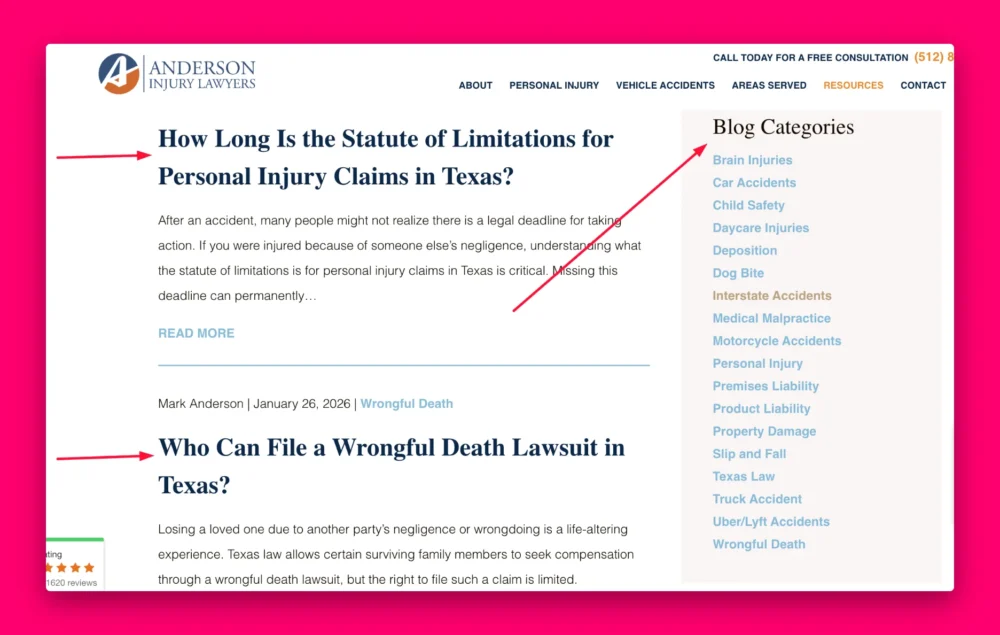
- Reduce cognitive load. Respect limited attention. Prioritize clarity over cleverness, simplify choices, use familiar patterns, and communicate in plain language to make complex tasks feel manageable. Going back to our law firm example, Anderson Injury Lawyers does this by maintaining a blog where users can find answers to their most frequently asked questions. And the titles are short, snappy, and to the point, which drastically reduces cognitive load.
- Design for diversity and edge cases. There is no “average” user. UX human-centered design considers accessibility, diverse abilities, and unexpected behaviors while keeping the main experience smooth and intuitive for most users.
- Treat accessibility as foundational. Accessibility isn’t an afterthought—it’s a design constraint that improves usability for everyone. Inclusive design leads to clearer interfaces, broader reach, and more resilient products.
- Build collaboratively across teams. Human-centered UX works best when designers, product managers, engineers, and support teams collaborate early and often. Shared user insights lead to faster alignment and better decisions.
The 6 Step Human-Centered Design Process You Can Use in Your Business
UX human-centered design doesn’t require massive teams, months of research, or expensive tooling.
In reality, the process works best when it’s lightweight, repeatable, and embedded into everyday product decisions.
Here’s a repeatable six-step process you can start using in your business today.
Step 1: Understand what people actually want
Human-centered UX starts by understanding people in their real environment. The goal isn’t to collect as much data as possible. It’s to uncover insights that genuinely influence what gets built.
Effective, low-friction research methods include:
- Short user interviews to understand goals, motivations, and frustrations
- Contextual observation to see how people actually complete tasks today
- Customer support and sales insights , which often reveal recurring pain points
- Product analytics, which can be used to identify friction rather than explain behavior
What matters most is synthesis .
Teams practicing UX human-centered design look for patterns in behavior, not isolated opinions. So they aim to understand:
- What users are trying to accomplish
- Where confusion or anxiety shows up
- What constraints shape their decisions (time, environment, ability, policy)
Step 2: Turn insights into a focused problem statement
Research only creates value when it’s translated into a problem worth solving.
In other words, clearly articulating the user problem before jumping to solutions.
A strong problem statement typically:
- Centers on the user, not the product
- Explains why the problem matters
- Avoids embedding solutions prematurely
For example, instead of defining a problem as “Users need a new dashboard,” a human-centered framing might be “Users need a clearer way to understand their progress because the current system makes it hard to know what action to take next.”
This clarity helps teams prioritize work based on real impact rather than internal urgency.
Step 3: Come up with options instead of “the one”
Once the problem is clear, teams can explore solutions.
Keyword: solutions. With an “s.”
UX human-centered design encourages generating multiple options before committing to a single direction.
This stage works best when:
- Designers, product managers, and engineers collaborate early.
- Ideas are evaluated against user needs, not personal preference.
- Constraints like feasibility and accessibility are considered upfront.
You’re not trying to be endlessly creative here. What you want is to ensure teams don’t default to the first idea that comes to mind.
Exploring options reduces blind spots and leads to more thoughtful, resilient solutions.
Step 4: Make prototypes
Here’s where you start saving time and money.
Instead of debating hypotheticals, human-centered teams create lightweight representations of ideas and present them to real users.
Prototypes can range from:
- Simple sketches or wireframes
- Clickable mockups
- High-fidelity flows for complex interactions
The key principle is to build only what’s necessary to answer the next question.
Step 5: Let humans break it (early)
Testing is where assumptions meet reality.
Testing lets you understand how people interact with a design rather than how designers expect them to.
So even though this part might be anxiety-inducing (and maybe even heartbreaking) for product developers, it’s one of the most vital phases.
What does effective testing focus on?
- Realistic tasks, not abstract opinions
- Observing behavior rather than defending designs
- Identifying patterns across users
In real-life application, this looks like your design team testing for and identifying…
- Where users hesitate or get stuck
- Where language or structure causes confusion
- Whether users feel confident completing tasks
Iteration isn’t a failure—it’s the point. Each round of feedback brings the product closer to something that genuinely supports human needs.
Don’t underestimate the power of testing. Even the most minuscule-seeming details can turn users on or away.
Have you ever visited a website only to click off out of fear you’d just entered a phishing website because of its 1990s-looking font?
There you go.
Even down to the fonts you choose directly affect readability, accessibility, and how intuitive an interface feels. And as you just realized, trustworthiness.
By the way, if you want an easy way to explore human-friendly typography without overthinking it, we offer free font generators that help teams experiment with type choices. It’s a simple, practical tool that fits naturally into the design process—especially during early ideation and prototyping.
Step 6: Ship with feedback loops
Launch isn’t the end of learning. It’s the beginning of real-world validation.
Post-launch feedback often comes from:
- Usage analytics
- Customer support interactions
- Direct user feedback
- Observing how behavior changes over time
Want a way to make sure this step doesn’t get skipped (like it so often does)? Schedule it.
High-performing teams schedule intentional check-ins after launch to ask questions like:
Are people using this as intended?
Where is friction still showing up?
What assumptions were incorrect?
How to Build a Human-Centered Culture
Without the right culture, even the best design processes break down. With the right culture, human-centered design becomes sustainable rather than performative.
The good news is that building this culture doesn’t require a massive redesign of the organization or new job titles.
Just a few intentional habits that keep people (not outputs) at the center of product work.
1. Make human insight part of everyday work
Teams that practice UX human-centered design regularly engage with real users instead of treating research as a special event.
This doesn’t mean running large studies every quarter. It means creating small, consistent touchpoints with human reality.
Here’s an example of some simple habits that make a big difference:
- Listening to one customer call or support ticket each week
- Reviewing usability findings during sprint planning
- Sharing short user insights in team meetings
2. Redefine “done” to include human outcomes
Don’t measure success solely by delivery.
Features aren’t considered complete just because they shipped. They’re complete when people can use them… successfully .
Teams can operationalize this by:
- Including usability and accessibility checks in the definition of done
- Tracking user success metrics, not just output metrics
- Reviewing post-launch feedback as part of the delivery cycle
This shift reinforces that UX human-centered design is about outcomes, not artifacts.
3. Encourage cross-functional ownership of UX
Human-centered design works best when it’s a shared responsibility.
This means designers shouldn’t be the only ones advocating for user needs. Product managers, engineers, and leadership all play a role.
Involve the engineering team early to avoid late-stage usability compromises.
Include customer support perspectives in planning.
Align stakeholders around shared user goals instead of isolated KPIs.
When everyone owns the user experience, UX decisions stop feeling like trade-offs and become investments.
4. Lead with empathy, not just efficiency
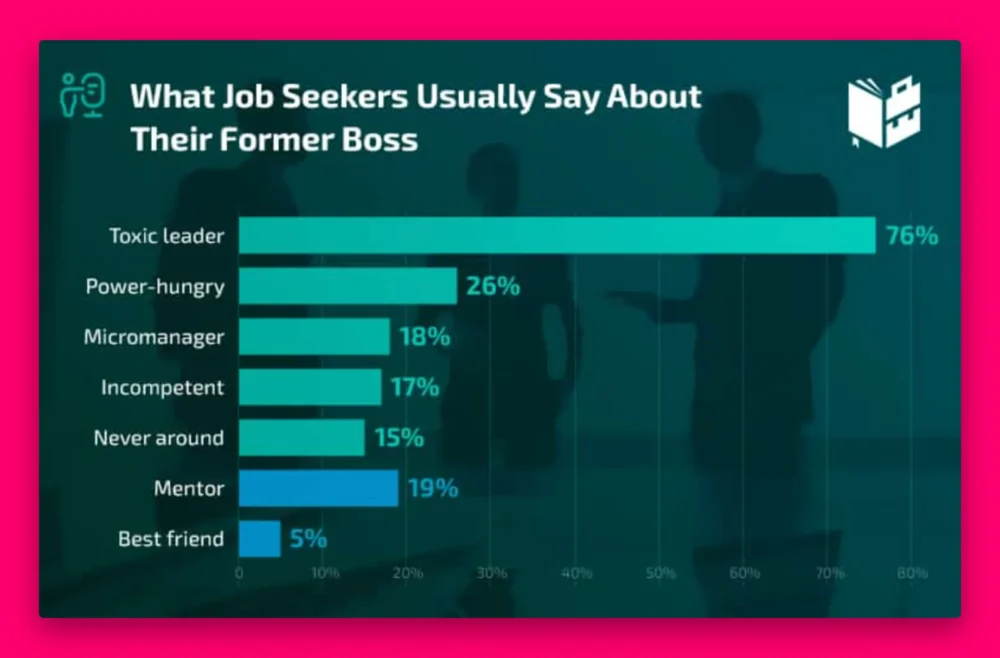
According to What To Become, over 70% of people in the job-hunting market said their last boss was a toxic leader.
Don’t be that guy.
Human-centered cultures start at the leadership level. When leaders model curiosity, humility, and openness to feedback, it creates psychological safety for teams to design with empathy.
Here are some excellent ways you can take charge of this culture shift in your business:
- Ask user-centered questions in reviews
- Value evidence over opinion
- Treat mistakes as learning opportunities
Conclusion
UX human-centered design is ultimately about building products that respect people. That includes how they think, feel, and move through the world.
When teams design around real human needs instead of assumptions, products become easier to use, easier to trust, and more likely to succeed.
You don’t need a perfect process to start. One real conversation, one tested assumption, or one simplified flow can change the trajectory of a product. Over time, those choices compound into experiences that don’t just function. They genuinely help.