In this article:
- What Time Management for Designers Actually Means
- 5 Reasons Time Management for Solo Designers Breaks Down
- 7 Time Management Tactics for a Busy Solo Design Studio
- The Non-Design Work That Wrecks Solo Studio’s Time Management
- 30-Day Time Management Sprint for Solo Designers
- Staying Solo vs Building a Small Team: Which Setup Supports Better Time Management
- 5 Metrics That Show Your Time Management System Works
- Where Your Studio Time Management Goes From Here
35% of a freelancer’s working hours never turn into an invoice. For a solo design studio, that gap shows up in real ways, like a week that seems under control until a deadline turns into a late evening rush.
This guide lays out the complete time management for designers. You’ll see why solo studio days lose structure and which 7 tactics help protect your design hours . It also covers a 30-day sprint to put these habits in place and the metrics you can use to track progress.
What Time Management for Designers Actually Means
Time management for designers is the practice of building your studio day around protected creative blocks and firm client boundaries, so the billable design work doesn’t get crowded out by everything else that running a business demands. Most of the work is defensive. You’re guarding the hours you already have.
The math behind a solo studio is rough. Freelancers spend roughly 6.2 hours a weekon scheduling and admin before a single deliverable gets touched. Top performers keep75% to 80% of their hours billable. Most solo designers are well under that, and the reason is almost always structural, not a discipline problem.
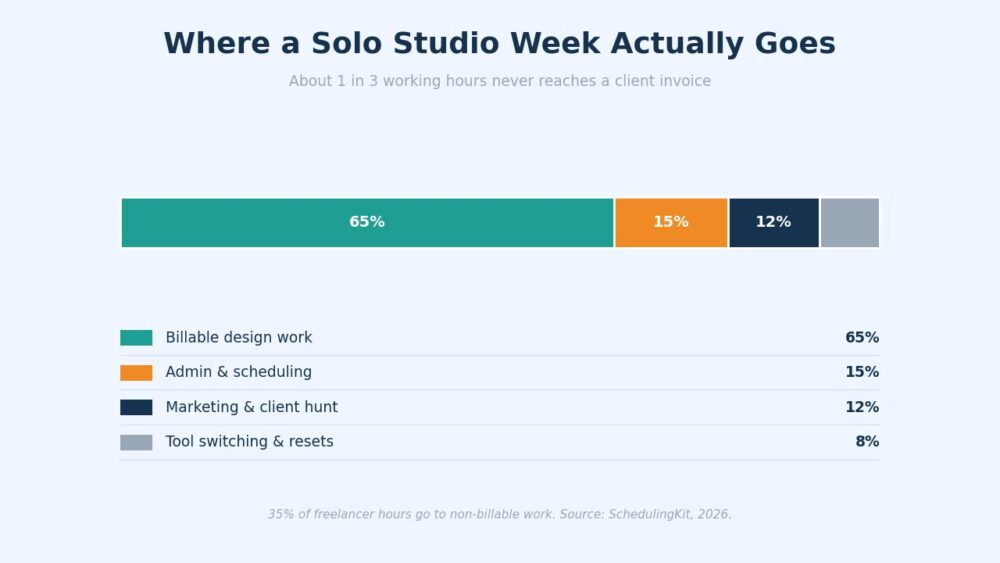
The single biggest leak is the money side. Invoicing, chasing, bookkeeping – they all tend to ambush you mid-project, right when your head is deepest in the work.
By the Numbers

Get 300+ Fonts for FREE
Enter your email to download our 100% free "Font Lover's Bundle". For commercial & personal use. No royalties. No fees. No attribution. 100% free to use anywhere.
Heavy context switching can swallow up to 40% of productive time. For a solo designer, that’s the bulk of your most expensive and hardest-to-replace hours leaking out through tab-switching and “quick” replies.
5 Reasons Time Management for Solo Designers Breaks Down
Here are 5 small leaks that can drain hours before the design even starts.
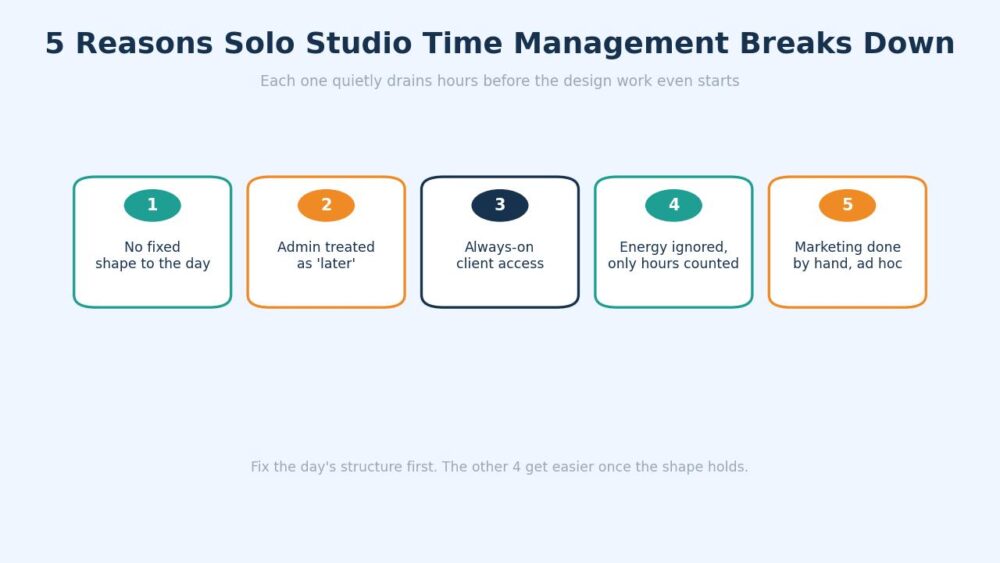
Reason 1: The Day Has No Fixed Shape
Employees inherit a structure. Solo designers have to build one, and most never do, so the day becomes whatever is received in the inbox first.
Reason 2: Admin Gets Treated as “Later”
Later means it piles up, then detonates as a Friday afternoon of invoices and unanswered emails that should have taken 20 minutes a day.
Reason 3: You’re Always Reachable
When a client can ping you at any hour and get a reply, every ping becomes an interruption. Each app toggle costs about 9.5 minutes of refocus time. Five of those and your morning is gone.
Reason 4 Is the One Nobody Puts on a Calendar: Energy
You can block 3 hours for a brand identity and still produce nothing if you hit that block at 3 pm on coffee and a skipped lunch. Designers track hours obsessively and ignore the fuel behind them.
Reason 5: Marketing Happens by Hand, When it Happens at All
Posting, outreach, and follow-up get done in stolen minutes between client work, which means inconsistently. So the pipeline dries up, and the panic cycle starts again.
That inconsistency creates a second problem. The same activities that keep your name visible are the ones that generate leads for your business . So when marketing gets pushed aside for weeks, future projects disappear from the pipeline too.
7 Time Management Tactics for a Busy Solo Design Studio
Start at the top. These build on each other, so Tactic 5 won’t hold if Tactic 1 isn’t in place yet.
1. Block Two Deep Design Sessions Before Anything Else
Put 2 protected design blocks on tomorrow’s calendar right now, ideally 90 minutes each, before email or Slack gets a vote. Treat them like client calls you can’t move. That is the whole point, because finished design work is the only thing that pays, and it’s the first thing a reactive day eats.
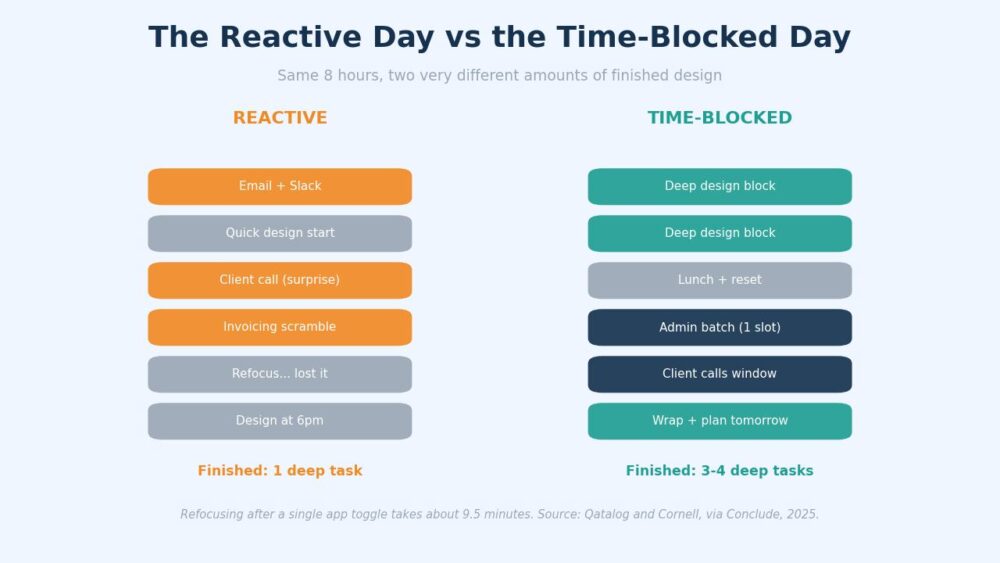
The difference isn’t subtle. A reactive day produces one half-finished task and a lot of fatigue. A blocked day produces 3 or 4 real things and a clear head at 5 pm.
2. Batch Admin Into One Slot a Day
Pick one 30-minute window, same time daily, for invoices, email, scheduling, and the rest. Outside that slot, the admin doesn’t exist. Batching kills the context-switching tax that makes a 5-minute task cost 20.
Common Mistake
Checking email “just to stay on top of it” between design blocks. Every check restarts the 9.5-minute refocus clock, so a single curious glance can cost you a quarter of an hour of real flow. Closed tab, not minimized tab.
3. Set Client Hours and Defend Them
Tell clients your hours and your response window in writing, then hold the line. Most reasonable clients never expected a 9 pm reply; they just never heard otherwise. Clear boundaries cut interruptions without costing you a single relationship.
4. Templatize the Work You Repeat for Every Project
Build a reusable kickoff document and handoff checklist once, then stop rewriting them. Knowledge workers waste over 4 hours a week on pure duplication. A template library turns that recurring drain into a 2-minute copy-and-edit.
This becomes even more important when your work includes internal portals, SharePoint sites, knowledge hubs, or company intranets. A surprising amount of design time is lost rebuilding layouts that already existed somewhere else.
The work looks productive because you’re designing, but a large portion of those hours is actually spent recreating structures, sections, and page components that have already been solved.
That is why template-driven systems have become such a major time saver in workplace design environments. ShortPoint is a strong example here. Teams use it to build reusable design elements for SharePoint and Microsoft 365 sites so they aren’t redesigning the same page patterns over and over again.
That consistency creates another benefit for designers: fewer revision cycles caused by layout differences between teams or departments. When the underlying structure stays consistent, designers can spend more time improving content presentation and user experience.
Over the course of a year, those saved hours add up far faster than most designers expect because the same patterns tend to appear across dozens or even hundreds of internal pages.
The lesson applies well beyond SharePoint. Every time you can turn a repeatable design task into a reusable system, you create more space for the work clients actually hire you to do. Time management improves because fewer hours disappear into rebuilding things that already had a solution.
5. Stop Hand-Building the Marketing You Keep Putting Off
The marketing work always loses to client work, so it never happens, and the pipeline thins out between projects. More discipline won’t fix that. The real move is deciding which of them you should never have been doing yourself in the first place.
Search visibility is the clearest case. Getting a studio site to rank means earning links from real publications, which is slow, relationship-heavy work with nothing to do with design. The agencies built for it let you approve every site before any outreach starts. The hour you’d otherwise lose to cold outreach is an hour you bill instead.
6. Track Where the Day Actually Goes for One Week
Log every working hour for 5 days. No judgment, just data. You’ll find the leaks fast, and they’re almost never where you assumed. This is the cheapest, highest-leverage thing on the list.
7. Match Hard Tasks to Your Real Energy Window
Find the 2-hour stretch where your focus is sharpest and guard it for the hardest creative work. Save email, exports, and admin for the dip. Freelancers are already 2.2x more likely than employees to use AI for automating work, which frees that peak window for the thinking only you can do.
Designers already understand the idea of systems. You don’t redraw a button every time you need one. You define a system, then reuse it so output stays consistent.
Your attention works in a similar way. If focus feels uneven across the week, the issue is deeper than scheduling. It shows up as a variation inside your cognitive system. One day you can move through a full identity system. The next day, the same work takes longer to get into, even with the same time blocked out.
Some designers start looking at performance inputs the same way they look at workflow consistency. The goal is not to change who they are on different days. The goal is to reduce swings in energy and mental clarity so deep work sessions feel more predictable.
That is where people use natural compounds like Tongkat Ali supplements as part of a broader routine for supporting steady energy and stress balance across the week. The way it’s typically used is not as a one-off boost before work, but as something taken consistently over time as part of a daily routine.
People tend to pair it with basic habits like sleep consistency, caffeine control, and structured work blocks so the overall system feels more stable rather than reactive.
The intent here is not to add another layer of inputs to your day. It’s to reduce fluctuation in how your focus behaves across different design sessions so your protected time blocks produce more stable and predictable output.
The Non-Design Work That Wrecks Solo Studio’s Time Management
Here’s the part most solo designers resist: a chunk of what fills your week shouldn’t be on your plate at all. The fastest win isn’t doing it faster. It’s getting it off your desk.
| Recurring task | What it really costs | Better home |
| Invoicing and chasing payment | 2-3 hrs/week, always mid-flow | One daily admin batch, automated reminders |
| Site updates, fixes, and security | Random 2 am fires | A monthly maintenance plan |
| Posting and replying on social | Daily 20-minute rabbit holes | A scheduler, batched once a month |
| Cold outreach for links | Hours, zero design output | Hand to a specialist |
Website upkeep is the sneakiest one. You built the site, so you “own” the plugin updates and security patches forever, and none of it is design. Plenty of solo studios hand off website maintenance to a specialized agency, so a 2 am “the site’s down” text stops being yours to answer.
Pro Tip
Run the “would I hire myself for this?” test on every recurring task. If you wouldn’t pay your own design rate for an hour of plugin updates, that hour shouldn’t be billed to your studio at your design rate either. Offload it and reclaim the block.
30-Day Time Management Sprint for Solo Designers
You don’t need a system overhaul. You need 4 weeks, one focus each, so the habit holds instead of stalling on day 3.
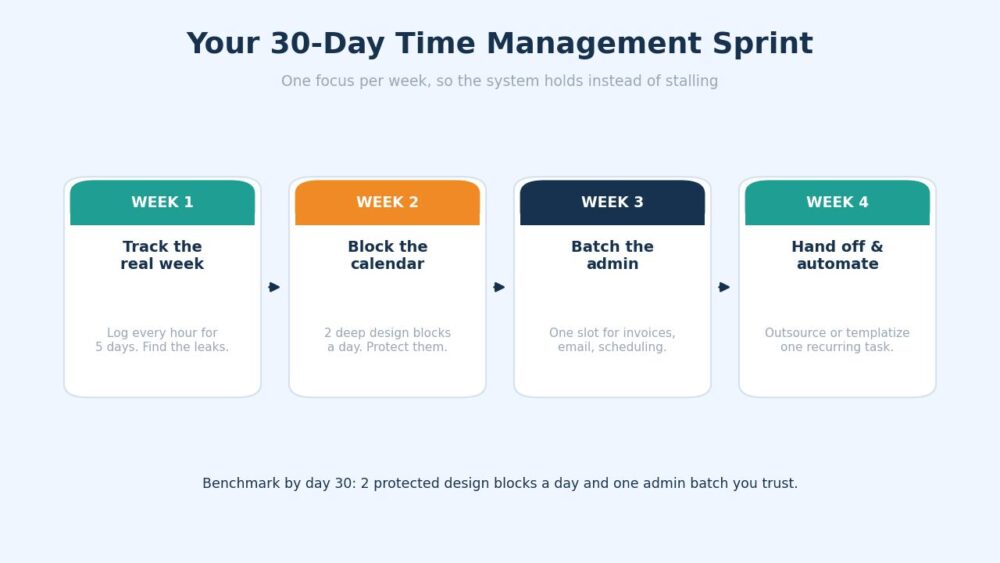
Week 1: Track the Real Week
Log every hour for 5 days and tally where the time actually went.
Benchmark for the end of week 1: A clear but slightly uncomfortable picture of your top 3 time leaks.
Common trap: Tracking for 2 days, deciding you “already know,” and quitting. The surprises come on day 4.
Week 2: Block the Calendar
Put 2 deep design sessions on every day and defend them.
Benchmark for the end of week 2: You protected at least 8 of 10 planned blocks across the week.
Common trap: Booking the blocks but answering Slack inside them. A defended block has notifications off.
Week 3: Batch the Admin
Move all invoicing, email, and scheduling into one daily slot.
Benchmark for the end of week 3: Admin is down to a single window, and your inbox is closed for the rest of the day.
Common trap: Keeping “just email” open all day. That’s not a batch – that’s a leak with a schedule.
Week 4: Hand off or Automate One Thing
Pick a single recurring task and get it off your plate for good.
Benchmark for the end of week 4: One task delegated, scheduled, or templatized, and a 1-page plan for the next.
Common trap: Trying to build the whole system from scratch. Don’t. A planning template gets you most of the way in an afternoon, and there are free ones worth starting from.
Staying Solo vs Building a Small Team: Which Setup Supports Better Time Management
At some point, the studio stops being just you, and the rules change. The first contractor or junior shifts the problem from personal calendar discipline to alignment, and the two need different tools.
| Staying solo | Building a small team | |
| Time management is | Personal calendar discipline | Shared priorities plus clean handoffs |
| Biggest risk | The bottleneck is you | Drift between people |
| Admin load | Batch it yourself | Delegate first, then align |
| Right tool | Calendar plus one batch slot | A shared, written goal system |
Two people can each have a perfectly organized calendar and still spend the week moving in different directions. That’s usually where the first time-management problems inside a growing studio appear. One person prioritizes client revisions while another focuses on a new project. Work gets done, but progress slows because priorities were never aligned in the first place.
A shared goal system helps solve that problem by giving everyone the same definition of what matters. Using something like the OKRs Tool becomes relevant. Rather than adding another project management layer, it gives small teams a simple place to document objectives and track key results, while connecting daily work to larger studio priorities.
For a solo designer, a calendar is often enough. Once other people are involved, written goals help reduce misalignment and make handoffs smoother without creating more administrative work.
Pro Insight
The trigger to add a tool isn’t a feeling of busyness; it’s a missed handoff. The first time work falls through a gap between you and a contractor, that’s your signal you’ve outgrown the calendar-only setup. Not before.
5 Metrics That Show Your Time Management System Works
Total hours worked tell you almost nothing. These 5 tell you whether the system is real.
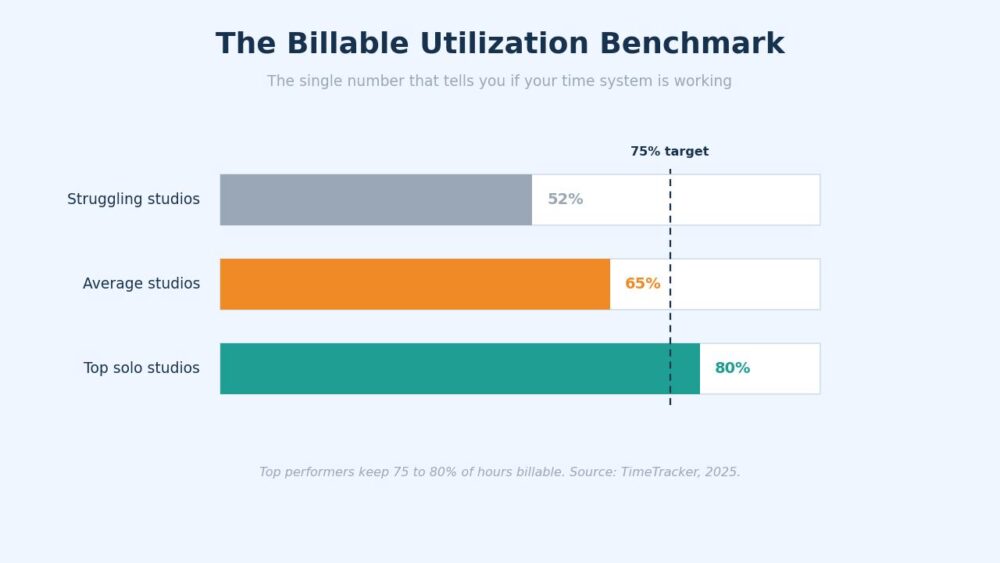
1. Billable Utilization Rate
The share of your hours that turn into invoiced work. Aim for the 75% to 80%top performers hit. Track it monthly and watch the trend, not the single number.
2. Protected Blocks Hit Per Week
Count how many of your planned deep-work blocks survived intact. If you planned 10 and held 5, that’s your real problem, named.
3. Admin Time Per Week
Total the hours spent on non-design work. The goal is steady and contained, not zero. Anything creeping past a half-day a week is a candidate for offloading.
4. Context Switches Inside a Focus Block
Roughly how many times you toggled away mid-block. The closer to zero, the more your deep work is actually deep instead of a string of interrupted minutes.
5. Days You Finished the Top Task Before Noon
The simplest one, and the most honest. A week where your hardest task got done in the morning most days is a week your system held.
Where Your Studio Time Management Goes From Here
A solo studio’s time management runs on protected hours, not extra ones, and the studios that defend that line ship calmer and bill more. Start with one honest week of tracking, then block, batch, and hand off from there.
When real life knocks the plan sideways, and it will, you fall back on the same cycle of tracking, blocking, batching, and handing off so the structure holds even on difficult weeks.
Author Bio:
Burkhard Berger is the founder of Novum™. He helps innovative B2B companies implement modern SEO strategies to scale their organic traffic to 1,000,000+ visitors per month. Curious about what your true traffic potential is?